zpool setup
2024
Install on Debian
Debian - install zfs
codename=$(lsb_release -cs);echo "deb http://deb.debian.org/debian $codename-backports main contrib non-free"|sudo tee -a /etc/apt/sources.list
sudo apt update -y
sudo apt install -y linux-headers-amd64
sudo apt install -y -t stable-backports zfsutils-linux
Create a zpool
Single, encrypted disk
Creating a ZFS pool with a single disk and data encryption
zpool create -O encryption=on -O keyformat=passphrase myencryptedpool /dev/sdX
To check if the encryption is active and its properties.
zfs get encryption,keyformat,keylocation myencryptedpool
To unplug the disk and put it on another computer
# Unplug
zfs unmount /myencryptedpool
zpool export myencryptedpool

# Plugin
zpool import myencryptedpool
zfs load-key backup
zfs mount backup
Mirroring
Mirror Pool (Mirror/RAID-1)
sudo zpool create monpool mirror /dev/sdX /dev/sdY
Mirror Pool (Mirror/RAID-1) and encrypted disk
sudo zpool create -O encryption=on -O keyformat=passphrase monpool mirror /dev/sdX /dev/sdY
RAID-Z (Redundant Array of Independent Disks - ZFS)
RAID-Z1, Tolerates the loss of a single disk and requires at least 3 hard drives
sudo zpool create monpool raidz1 /dev/sdc /dev/sdd /dev/sde /dev/sdf
Replacing a faulty disk
List of devices
sudo fdisk -l
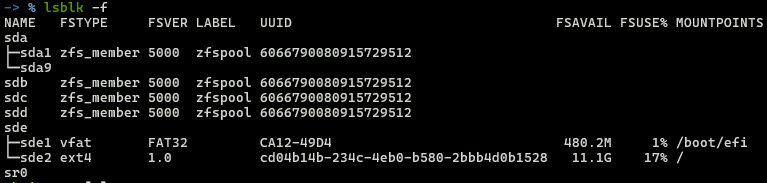
lsblk
Note
Result
Find device ids
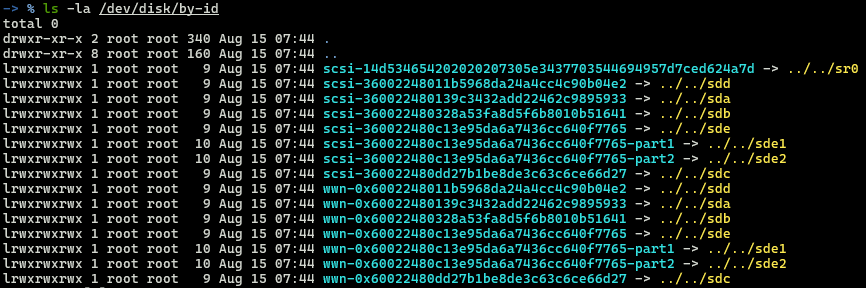
ls -rtl /dev/disk/by-id
Note
Result
Do the replacement
sudo zpool replace zfspool 12349527577240784111 scsi-360022480139c3432add22462c9895933
Managing Data Corruption
Integrity check
zpool scrub tank
Get status of the pool
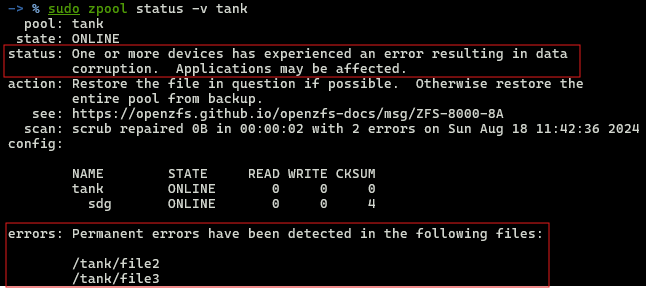
zpool status -v tank
Note
Result